February '26
February’s release focuses on improving navigation, reconciliation flexibility, localisation, and document processing accuracy. These updates make it easier to manage large numbers of queues and models, add greater control to reconciliation workflows, and improve the platform experience for international teams.
1. Search and Sorting for Queues and Models
Managing a large number of Queue Groups, Queues, and Models can make navigation difficult. Previously, users relied on browser search to locate items, which did not preserve queue hierarchy and made it harder to understand context.
This release introduces native search and sorting capabilities to improve discoverability and help users prioritize their work more efficiently.
How it works
Search
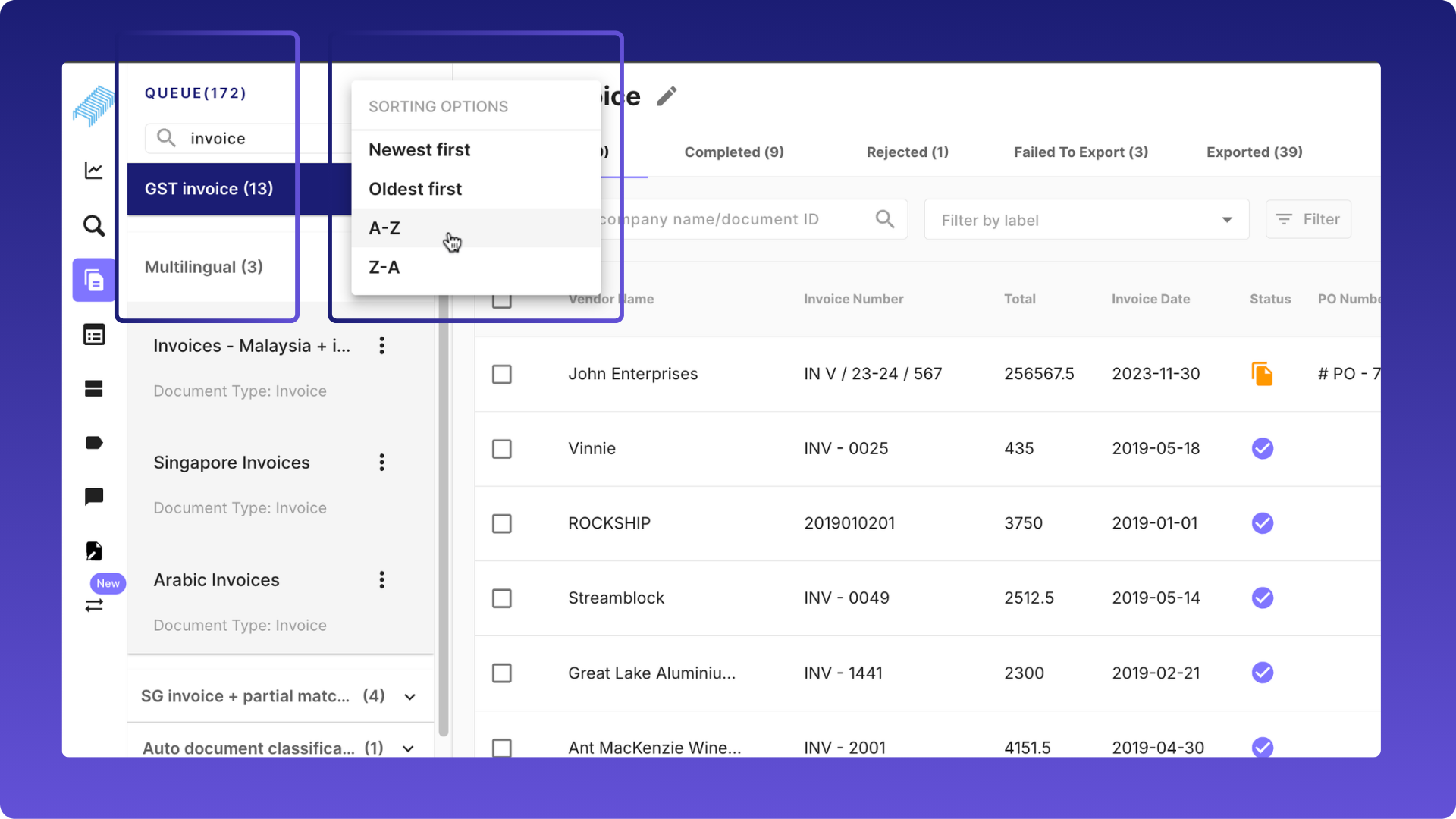
Users can now search for Queue Groups and Queues directly from the Queues page.
- Search results update automatically as users type.
- Results preserve the queue hierarchy, showing the Queue Group and its associated queues.
- If a Queue Group matches the search, all its child queues are displayed.
- If a Queue matches the search, the system displays the queue together with its parent Queue Group.
Users can also search Models by name from the Models page.
Sorting
Queues can now be sorted using multiple criteria:
- Name (A–Z / Z–A)
- Created Date (Newest First / Oldest First)
- Latest Document Uploaded
- Pending Documents (Uploaded + Received)
Models can also be sorted alphabetically:
- Name (A–Z)
- Name (Z–A)
Benefits
- Faster navigation across Queue Groups, Queues, and Models
- Improved discoverability in environments with many queues
- Ability to prioritize queues with recent activity or higher workload
- Reduced reliance on browser search workarounds
2. Label Support for Reconciliation
Reconciliation previously relied only on system-generated statuses such as Fully Reconciled, Partially Reconciled, Not Reconciled, and Error. These statuses were sometimes insufficient to represent business-specific reconciliation scenarios.
This release introduces custom labels for reconciliation, allowing users to classify reconciliation results based on configurable business rules.
.png)
How it works
Users can now create reconciliation rules using field comparisons: When the rule condition is satisfied, a user-defined label is automatically applied to the reconciliation.
Example:
- If Invoice Amount > Purchase Order Amount, the reconciliation can be labeled Overcharged.
- If Delivery Order Amount < Purchase Order Amount, the reconciliation can be labeled Not Fully Delivered.
Custom labels work alongside the existing reconciliation statuses without changing current workflows.
Benefits
- Greater flexibility in representing reconciliation outcomes
- Ability to implement business-specific reconciliation logic
- Improved visibility when reviewing reconciliation results
3. Configurable Document Display Name in Reconciliation
Previously, the system used file name as the primary identifier for documents in reconciliation views. File names are often auto-generated and not meaningful for users.
This release allows customers to configure a business-relevant field to display as the document identifier.
How it works
A new configuration allows users to define a display_name_field for each document type.
Examples of display fields:
- Invoice Number
- Purchase Order Number
When configured, the selected field appears as the primary document identifier in reconciliation lists and document links.
If no display field is configured, the system continues to display the file name.
Benefits
- Improves readability in document lists and reconciliation views
- Aligns document identification with real business identifiers
- Makes reconciliation workflows easier to interpret
4. Dashboard Localisation (Chinese and Japanese)
Staple now supports localisation for Chinese and Japanese users across the main dashboards.
This enhancement allows users to interact with the platform in their preferred language, improving usability for international teams.
What’s included
Chinese localisation is now available for:
- Staple Dashboard
- Reconciliation Dashboard
- Document Editor Dashboard
.png)
The platform interface, including buttons, labels, notifications, and messages, is translated to support Chinese-speaking users.
Japanese localisation support has also been extended to improve accessibility for teams operating in Japan.
Benefits
- Better usability for Chinese and Japanese users
- Improved accessibility for global teams
- Supports adoption of Staple AI in international markets
5. Complex Table Type Consolidation
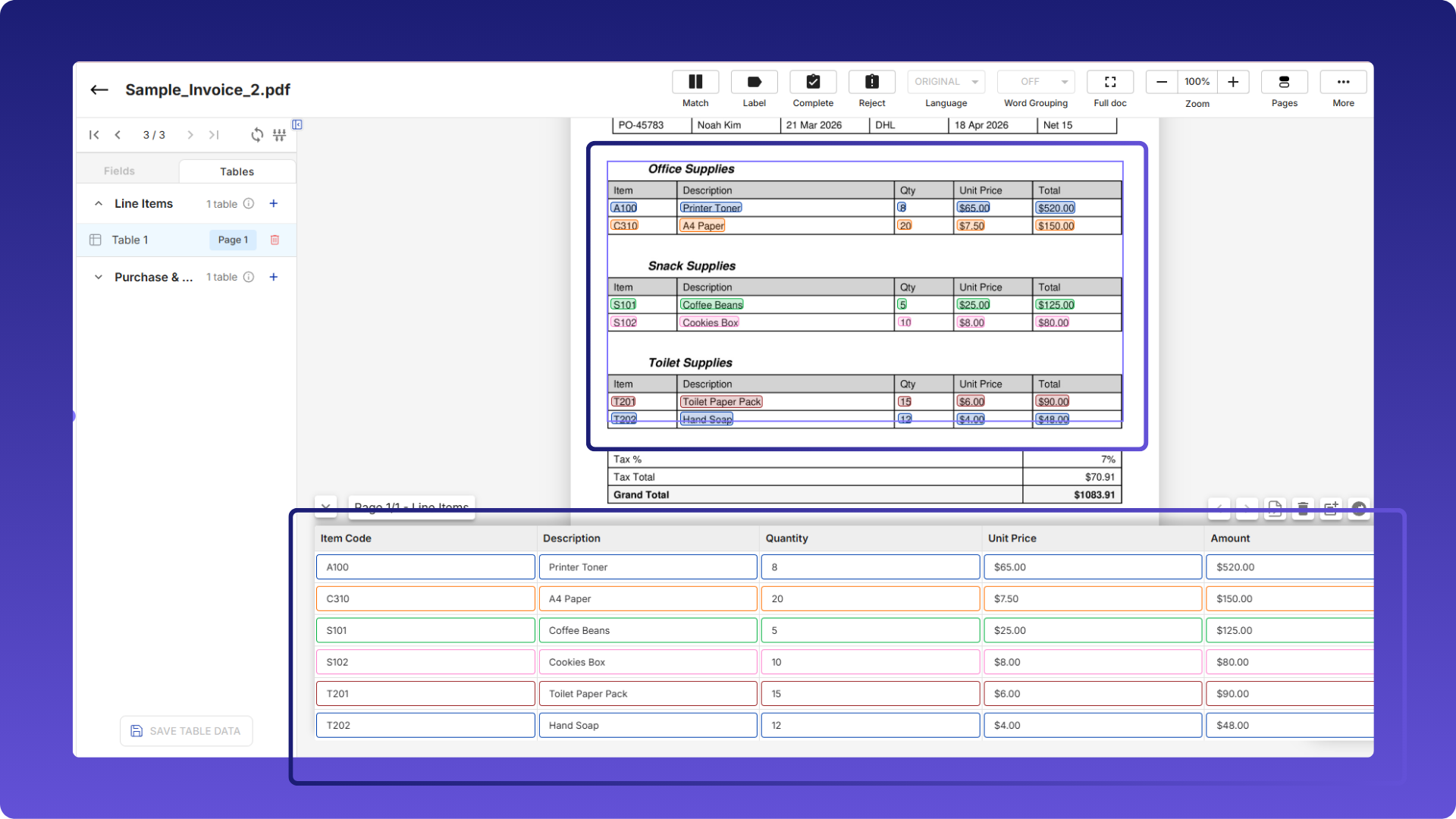
Some documents contain multiple tables of the same category on a single page. Previously, these tables were processed separately, which could create duplicate table structures.
This release introduces automatic consolidation of tables with the same category.
How it works
- Tables with the same category on the same page are automatically merged.
- During annotation, the UI enforces a rule allowing only one table instance per category per page.
Benefits
- Cleaner document structure
- Easier review of extracted data
- Reduced duplication in table extraction
Minor enhancements
1. Complex Table Translation Workflow Improvements
Previously, complex table extraction always triggered translation requests to the translation service, even when translation was disabled or unnecessary. This caused unnecessary processing overhead.
This release improves the translation workflow for complex table extraction.
Benefits
- Reduced processing time for English documents
- Improved extraction accuracy
- Lower load on translation services
- Consistent translation behavior across scanning and Smart Fill workflows
2. Removal of Predefined Model and Smart Table UI Options
To simplify the product interface and align with the current architecture, several legacy options have been removed from the UI.
Changes
- Predefined model creation options removed from Queue Settings
- Smart Table and Feedback configuration options removed from Preferences
- Models now use Complex Tables only
This simplifies the configuration experience and removes outdated UI elements.
3. GraphQL Security and Dependency Improvements
This release includes backend improvements to improve security and maintainability of the GraphQL service.
Updates
- Express upgraded to a security-patched version
- Legacy MySQL-related code removed
- Critical dependencies upgraded:
- cookie
- jsonwebtoken
- qs
Benefits
- Improved platform security
- Reduced technical debt
- Better long-term maintainability of the GraphQL service